

Knock-A-Gnome | Hardware Programmer
Tools Used: Unity, Visual Studio, C#, RotoChair, MetaQuest
Work Process
The RotoChair Unity package and documentation were made for the user to have the RotoChair turn with their head when in VR. We wanted to do something different – we wanted the chair to turn with the lawnmower – so it was up to me to make that happen. Here’s some of my work on the project and some problems I had to solve working on it!
Controlling the RotoChair
Below is an edited version of the script I wrote that handles the communication between the design team and the RotoChair in Knock A Gnome. I started working on this script right after we pitched and before we had the concrete details hashed out – we only knew we wanted to use the RotoChair. So I made this script with two modes that the design team got to pick from: a checkpoint based version and a follow rotation version. We ended up using the checkpoint system as it was easier for the design team to work with and control, so that got fleshed out a bit more.
The communication to the chair itself is handled by the RotoController script as a part of the RotoChair Unity package, but even that sometimes had its issues, as I write about in the Problem Solving section. It took quite a bit of learning, testing, and trial and error to figure out the best way to control it!
Admin Panel
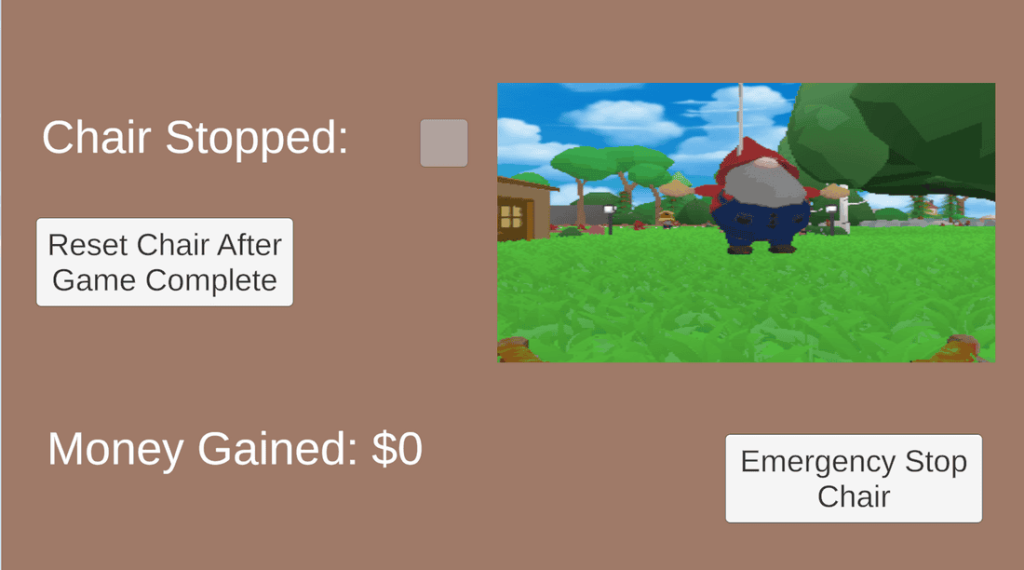
When developing VR games in the past, the easiest way for us to play the game is to simply transfer the game to the VR headset then play from there. That couldn’t work with Knock A Gnome for one simple reason – the game needed to still be connected to the chair via a USB cable. We couldn’t hook up the VR headset to the chair, so they both needed to go through a laptop as an intermediary. This led to the creation of the Admin panel for the game – a simple screen that the game operators would have access to that had some controls for the chair alongside a viewport of what the player was seeing.
This was very fun to work on as I got to figure out the best way to show what was happening in the VR headset on a small part of the Admin panel. I ended up setting up a Render Texture to essentially screenshare the VR headset to the viewport on the Admin panel. Add in a few buttons to control the chair and the Admin panel was done.
The panel uses standard unity assets because it’s not meant to be player facing. I love making tools for other people I work with and this was no different! Check it out below.
Problem Solving
During the course of the project, I noticed a some of issues that I fixed for Knock A Gnome with the RotoChair Unity package and the RotoChair we had access to. Here’s a couple of them!
Inaccurate Reporting
The first issue I encountered with the Chair itself was how it reported its current angle. The RotoChair is controlled via a console that outputs a bunch of data about the chair including its current rotation. The problem is that the chair’s output angle was always 4 degrees off. I still don’t know for sure what caused this but I think the cause is just the chair being half a decade old or so and it being moved around a lot.
I encountered this issue when drafting the rotation controller for the RotoChair – the first draft of the controller had the chair continuously rotating until it hit a specific rotation. Because the output rotation was four degrees off, it would cause infinite loops and unspecific rotations.
Memory Leak
As we were working on Knock A Gnome, we discovered a problem – we couldn’t run the game for more than a couple of hours at a time. This screams memory leak, so we trawled through our codebase to find the issue. For a while we weren’t able to find the issue because of one simple reason: we were looking through our own code. At one point, I decided to look through the RotoChair’s package to see if that was causing the issue, and it was. In the RotoChair’s package, it closes the RotoChair command console in between uses by searching the list of open programs for “RotoVRCmd”. All I had to do to fix the problem was add a “.exe” at the end of the string and suddenly the memory leak was fixed.